

Question

์Request to include Apple Search Ads “Installs (Total)” KPI in API/Looker Studio

  • November 12, 2025
  • 1 reply
  • 5 views

Sarunyapat
Forum|alt.badge.img

Could you please help us surface the Apple Search Ads KPI “Installs (Total)” in our reporting? At the moment, the API/connector appears to provide only “Installs (Tap-Through).”

For reference:

  • Apple Search Ads dashboard: Installs (Total) = 9,035
  • Looker Studio / export: Installs (Tap-Through) = 6,133

Below is reference that what we see in ad manager platform 
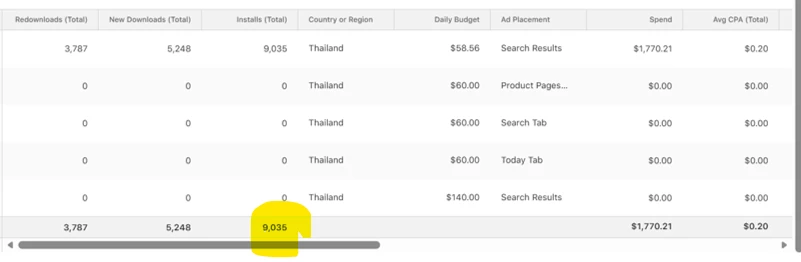
Installs(Total) = 9035

ฺีBut what we found on Looker studio about installs we have only Tap-though, below is what I export from ad manager like
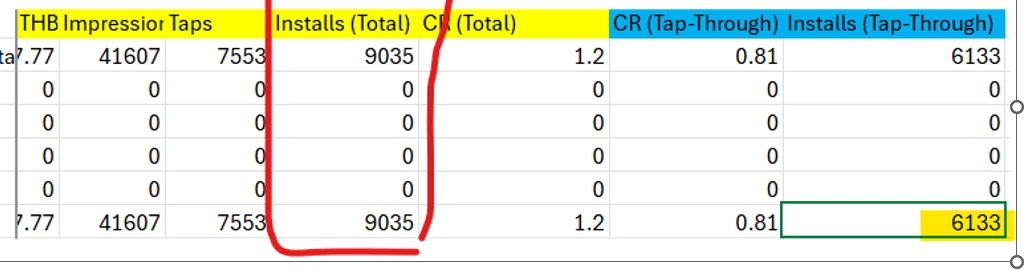
 

Installs(Tap-Thorough) = 6133


This suggests we’re missing non–tap-through installs (e.g., view-through) in Looker Studio.

Requests:

  • Is there an API field/endpoint for “Installs (Total)” that we can enable in the connector?
  • If not, how should we calculate “Installs (Total)” in Looker Studio? For example, is it Tap-Through + View-Through, and which API field maps to View-Through installs?

Thank so much in advance.


Best regards,

Sarunyapat

1 reply

Sahra
Forum|alt.badge.img+6
  • Community Moderator
  • December 3, 2025

Hi ​@Sarunyapat,

We confirmed the best way to get your Installs (Total) metric (the 9,035 number) is to combine two separate metrics available in the Supermetrics connector.

The issue isn't that a field for "Installs (Total)" is missing; it's that the platform treats Installs (Total) as the sum of two underlying metrics: Tap-Through and View-Through.

$$\text{Installs (Total)} = \text{Installs (Tap-Through)} + \text{Installs (View-Through)}$$


1. The Supermetrics Metrics to Use

When you select metrics in the Supermetrics sidebar:

Your ASA Dashboard Metric Supermetrics Metric Name Attribution Window
Installs (Tap-Through) (Your 6,133) Installs 30 days (Tap-Through)
Installs (View-Through) (The missing piece) View-through installs 1 day (View-Through)


2. How to Fix Your Looker Studio Report

  1. Update your Supermetrics query: In your data source configuration for Apple Search Ads, ensure you have both the Installs and View-through installs metrics selected.

  2. Create a Calculated Field in Looker Studio:

    • Field Name: Installs (Total)

    • Formula:

      SUM(Installs) + SUM(View-through installs)

This calculated field will give you the complete Installs (Total) number you see in the Apple Search Ads dashboard.


💡 What if you can't find "View-through installs"?


If you are unable to find the "View-through installs" metric in the Supermetrics field list, please submit a ticket to our support team right away in the Supermetrics Hub. They can check your specific account permissions and connector version to ensure you have access to all available Apple Search Ads metrics.