Question

Basic OAuth script

  • February 13, 2026
  • 3 replies
  • 42 views

KennethDG

Hi,

I’m still fairly new to working with APIs and I’m setting up my first configuration in Postman. I’ve managed to connect and fetch data successfully.

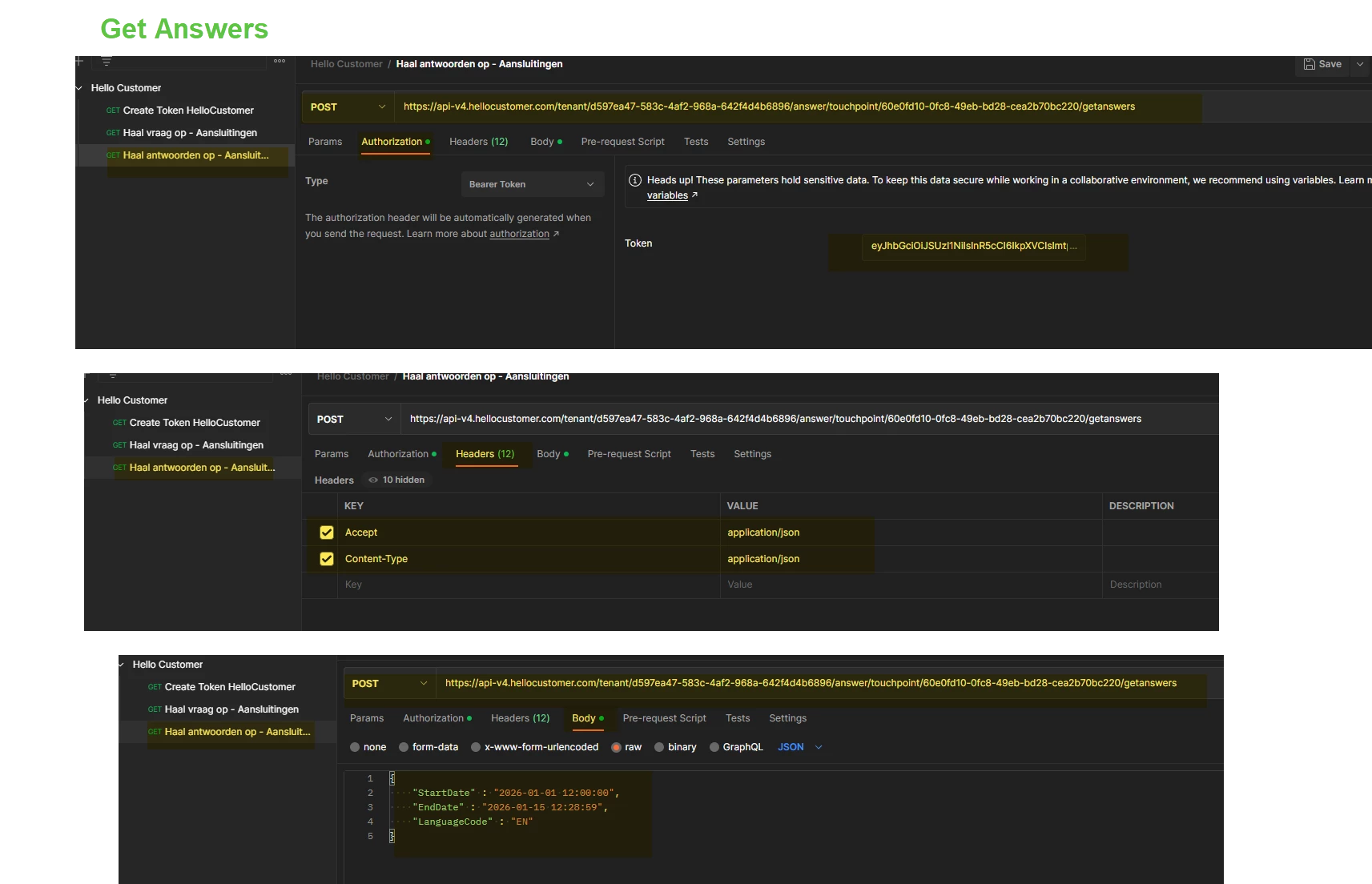
I’m now trying to recreate this in Supermetrics’ Connector Builder, but I keep getting error messages that don’t help me much. Could you help me with a basic script based on my working Postman configuration (see screenshots)?

Thanks a lot!

3 replies

tittakeskinen
Forum|alt.badge.img
  • Community Moderator
  • February 16, 2026

Hey ​@KennethDG ! You can find documentation details for Oauth2 authentication type from here: https://docs.supermetrics.com/docs/authentication#oauth2-authentication with examples and steps required for configuring the full flow. 

A complete example configuration for a connector using Oauth2 as authentication method can be found here: https://docs.supermetrics.com/docs/example-configurations#hubspot-form-submissions


If these do not help, could you please share which API you are creating a connector for (i.e. link to the API docs) and I can help you with configuring the authentication required for that specific API!


KennethDG
  • Author
  • Newbie
  • March 6, 2026

Hello
I have worked on your feedback and eventually enabled Copilot to help me further. Unfortunately, I still haven't succeeded. Is this information correct?
Hello Customer uses:
OAuth2 client_credentials
no user
no authorization endpoint
no authorization code
no redirect

Supermetrics OAuth2 requires:
user authorization
authorization_code
redirect & callback

More info about the Hello Customer API https://hs.hellocustomer.help/knowledge/api-connectors-and-api-calls#Authentication 


tittakeskinen
Forum|alt.badge.img
  • Community Moderator
  • March 11, 2026

Hey ​@KennethDG ! Sorry for the delay here. 

I took a look at the API documentation you provided, and that kind of authentication flow should be supported in our tooling with authentication type “single_step_oauth2”. 

Here is an example configuration for that flow:


 "authentication": {
    "type": "single_step_oauth2",
    "description": "",
    "userInputs": [
      {
        "id": "login_name",
        "label": "Give a name for your login",
        "type": "text"
      }
    ],
    "singleStepOAuth2": {
      "clientId": "[encrypted client ID]",
      "clientSecret": "[encrypted client secret]",
      "tokenLifetime": [token lifetime],
      "authentication": {
        "tokenJsonPath": "$.access_token",
        "request": {
          "method": "POST",
          "url": "[token endpoint],
          "body": {
            "type": "urlencoded_form",
            "formData": [
              {
                "name": "client_id",
                "value": "{{oauth2.client_id}}"
              },
              {
                "name": "client_secret",
                "value": "{{oauth2.client_secret}}"
              },
              {
                "name": "grant_type",
                "value": "client_credentials"
              }
            ]
          }
        }
      },
      "refresh": {
        "tokenJsonPath": "$.access_token",
        "request": {
          "method": "POST",
          "url": "[token endpoint],
          "body": {
            "type": "urlencoded_form",
            "formData": [
              {
                "name": "client_id",
                "value": "{{oauth2.client_id}}"
              },
              {
                "name": "client_secret",
                "value": "{{oauth2.client_secret}}"
              },
              {
                "name": "grant_type",
                "value": "client_credentials"
              }
            ]
          }
        }
      }
    },


You can also request Client ID and Client Secret as an user input during authentication phase if you need to be able to create multiple connections with different credentials. Then the “clientId” and “clientSecret” values can be encrypted to be any value, and instead of {{oauth2.*}} placeholders you can use {{inputs.*}} placeholders. Let me know if this is the case for you, and I can provide more detailed example for that use case as well!


Hope this helps! If not, we can also have a call to go through your case if you’d prefer that!